
Use Claude Code on an existing project by tracing the behavior you want to change, agreeing on a bounded plan, and checking the result against the running application. The goal is a change you can explain and verify, not a large diff that happens to look convincing.
Start with the Claude Code extension in VS Code and a locally runnable project. We will use a CSV-export screen as an illustrative example: first clarify its button label, then tackle a more substantial date-validation change. Adapt the examples to your repository; the filenames and requirements below are not claims about your app.
The distinction matters. A label change teaches you how to review Claude's work. A validation change tests whether you can preserve behavior across the interface, server and tests.
Get Claude Code Ready in VS Code
Install the Claude Code extension in VS Code 1.94 or later. Open Extensions with Cmd+Shift+X on Mac or Ctrl+Shift+X on Windows and Linux, find Claude Code by Anthropic, and install it. Open a file, click the spark icon in the editor toolbar, and sign in. The panel bundles its runtime; a separate terminal installation is unnecessary for this workflow.
Use an approved Claude account: a paid Claude subscription or the appropriate organizational account. Claude Console is a separate API-billing route. Do not create an API key simply because another tutorial uses one.
With a Claude subscription signed in, /usage opens the account and usage display. Check whose allowance you are consuming. Reaching a limit does not mean you must buy more usage; waiting for its reset remains an option.
Before continuing, you need:
- Access: Permission to share this repository with the provider, not merely permission to edit it.
- Environment: A local development copy that already runs, with its normal dependencies available.
- Recovery: Git history or another approved backup process, plus a known starting state.
- Test data: Non-sensitive samples and local services, not production credentials or customer exports.
If the app does not run yet, solve that separately. Otherwise, a later failure tells you little about whether Claude caused it.
Step 1: Establish the Starting State
Open the repository itself in VS Code, not the parent folder containing several projects. Inspect Source Control before starting a session.
Run these in that repository's terminal:
git status --short
git branch --show-current
Git's short status identifies tracked changes and untracked files. No entries is the expected starting point for this exercise, but ignored files are normally absent from that output. A clean status is not a privacy check.
If somebody else's changes appear, coordinate before touching them. Preserve your own unfinished work through your normal workflow. Do not ask Claude to clean everything up, and do not stash work whose ownership you have not resolved.
The branch command should show the expected branch. An empty result means you need to resolve the detached-HEAD situation first. If your project permits a new feature branch, use a meaningful unused name:
git switch -c improve-report-exportThis creates and switches to a local branch; it does not upload your work. Inspect an existing branch with that name rather than replacing it.
For the CSV-export example, open the report screen in your running local app and record how it behaves before making changes:
- What does the button currently say?
- Which formats can it produce?
- What happens with no results or insufficient access?
- Which existing test command covers this area, and does it already pass?
Keep a short note of those results. Comparing them with the same checks after the edit will help you distinguish a new failure from an existing problem.
Step 2: Trace the Feature Before Planning the Edit
Select Plan using the mode indicator below the prompt box. Do not assume a new session starts with manual approval enabled.
Ask for a focused code map, not an explanation of the entire repository:
Investigate the existing report-export screen before editing.

Read the repository instructions and setup/test documentation.
Find the visible button, its label source and click handler.
Trace the export request through authorization, validation,
data loading and CSV creation wherever those exist.

Return the relevant file paths, the nearest tests, and the
existing commands for the local app and targeted checks.
Distinguish verified behavior from assumptions.

Do not edit, install dependencies, start services, run tests,
create subagents or contact external services yet.
The reading order should answer concrete questions:
| Read | Question It Should Resolve | What to Keep |
|---|---|---|
| Project instructions and setup notes | How does this project expect work to happen? | Package manager, test commands, protected areas |
| Screen component and label resources | Where does this interaction start? | Visible text, accessibility text, shared keys |
| Handler and request code | What does clicking actually call? | Parameters, state changes, error handling |
| Server route and service, if present | Where is behavior enforced? | Authorization, validation, data access |
| Nearby tests and callers | What else depends on this behavior? | Existing fixtures, test style, shared consumers |
Use an @ file reference when Claude follows a similarly named but unrelated component. Open the identified file yourself. A confident path in a response is not enough if the application imports a different implementation.
For a monorepo, name the package and working directory. A valid command run from the wrong package can test the wrong thing. Also distinguish source from generated output: editing a generated client or built bundle may disappear on the next build.
My preference is to ask for the request path before the patch. It reveals whether Claude understands the feature or has only found a matching string.
Step 3: Set the Boundary in the Prompt and the Controls
Your prompt describes the task. Permission rules control tool access. They are related, but a sentence saying not to deploy does not configure a technical deployment block.
For unfamiliar code, use these permission modes deliberately:
| Mode | What It Means for This Session | When to Use It |
|---|---|---|
| Plan | Investigates and proposes changes before source edits; shell commands can still run under applicable permissions | Understanding behavior and reviewing the approach |
| Manual | Requests approval for edits and most shell actions, subject to existing rules | Applying a change you want to inspect closely |
| Auto or Edit automatically | Can change workspace files without individual edit approval | Later, when the scope and review process are well understood |
Do not enable bypass permissions for this exercise. Plan mode is not a no-execution environment, and Manual does not erase existing approvals. Review the active configuration rather than treating the mode label as a complete security boundary.
When a permission prompt appears, read the command, working directory and proposed effect. A test command might invoke setup scripts, network services or database preparation. Ask what it touches before approving something unfamiliar.
A useful plan states:
- The behavior that will change.
- The behavior that must remain unchanged.
- The exact files expected to change, with reasons.
- The checks that distinguish success from a plausible-looking implementation.
- Anything that requires a separate decision, such as a new dependency or migration.
Do not make the file list so rigid that Claude must hide a necessary change. Ask it to stop and explain when evidence points outside the agreed scope.
Step 4: Make the Small Change, Then Inspect Its Reach
For the first pass, suppose the existing button says Download report and always produces CSV. Change it to Download CSV only after verifying that output format.
Plan the label change from Download report to Download CSV.
Confirm that this action always exports CSV first.

Preserve the click handler, permissions, layout, loading and
disabled states. Follow the existing translation system and
keep accessibility text and relevant tests consistent.

List the files and checks. No unrelated formatting, refactoring,
dependencies, commits, pushes or deployment. Wait for approval.
Choose the plan-approval option for manually approving edits, then confirm the indicator shows Manual. Inspect each proposed diff before accepting.
Pay attention to changes that look small:
- Shared translation key: Does the same key label a PDF export elsewhere?
- Accessible name: Will assistive technology still describe the visible action correctly?
- Test update: Did Claude change the expected label, or remove the assertion entirely?
- Handler change: Why did behavior change when the task only concerned wording?
Reject unrelated cleanup, even if it looks elegant. A refactor can be worthwhile, but it needs its own reason and review scope.
Once the label and unchanged export behavior check out, save that reviewed work through your normal Git process before the next exercise. Keeping the two changes separate makes the second diff easier to understand and recover.
Step 5: Handle a Real Validation Change Across Layers
Now consider a more substantial illustrative requirement: reject report requests whose end date comes before the start date. Valid date ranges must continue to produce the same CSV, and users must retain the same access restrictions.
The interface might disable submission, but that alone does not demonstrate what the server does when it receives an invalid request directly.
Decide the Contract Before Writing Code
First resolve the existing product behavior. Are these calendar dates or timestamps? Which timezone determines a boundary? Is a same-day range valid? Does the API already have a standard validation-error response?
For this example, the agreed rule is about date-only values, same-day ranges remain valid, and the existing error format must be reused. These are example requirements, not universal rules to impose on a reporting system.
Give Claude a plan request with those decisions:
Plan the date-range validation change using the existing export
path we identified. End before start must be rejected; same-day
and later end dates must keep working.

Identify the authoritative validation layer and existing date
parsing convention. Reuse the current API error format and UI
error presentation. Keep authorization and CSV output unchanged.

Show how a direct invalid API request will be tested without
reaching the export data query. Identify shared callers affected
by any validator change. Propose tests before implementation.

No new dependencies, schema changes or timezone-policy changes.
If the current contract is unclear, stop and show the ambiguity.
This is the point where I want an explanation of the boundary, not more code. A validator inside the button handler and one on the server solve different problems.
Review the Cases, Not Just the Happy Path
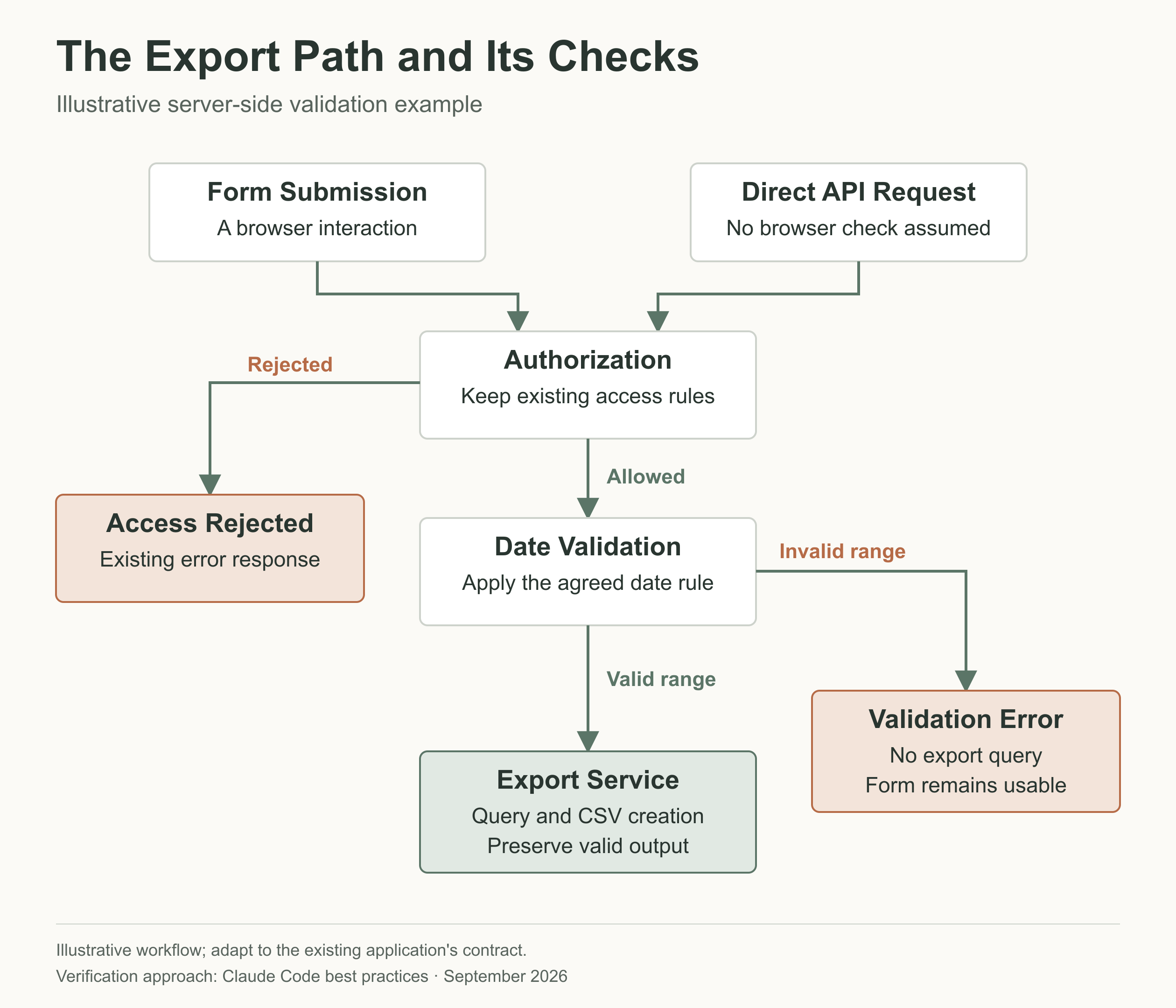
Use a case table before accepting the implementation:
| Case | Expected Result in This Example | Useful Evidence |
|---|---|---|
| End before start | Existing validation-error response; no export query | Server test asserting both response and skipped query |
| Same start and end | Accepted under the agreed date-only contract | Boundary test |
| Valid multi-day range | CSV still generated with unchanged columns | Existing export test and sample file |
| Missing or malformed date | Existing input-validation behavior preserved | Existing parser/route tests |
| User lacks export access | Existing authorization behavior preserved | Access-control regression test |
| UI receives validation error | Clear message and usable form | Component test or local interaction |
Checking for an error message does not establish that an expensive export query was skipped. A new unit test for a helper does not prove the route calls that helper.
Ask Claude to identify where mocks replace real behavior. A mock is useful for verifying that a query was not called; it cannot prove that the production database returns the right records.
Implement One Coherent Patch
Approve the smallest complete change spanning the necessary layers. Reuse the repository's parser, validation pattern and fixtures rather than introducing a second date system.
For a bug the existing test framework can reproduce, have Claude add the relevant regression test and run it before the fix. Confirm it fails for the intended reason, then apply the change and rerun it. A failure caused by a missing environment variable is not a reproduction of the date bug.
If the project has no test harness, do not casually approve installing one during this task. Agree on explicit local checks, keep the limitation visible, and decide separately whether introducing automated coverage belongs in scope.
Step 6: Verify the Diff and the Running Behavior
Review all the Git changes, not only the last edit displayed in the conversation:
git status --short
git diff
git diff --cached
git diff --check
git diff shows unstaged tracked changes; git diff --cached shows staged changes. Inspect untracked files separately. git diff --check can catch whitespace errors and conflict markers in the unstaged diff, not functional bugs. Use git diff --cached --check if reviewing a staged diff.
Before running a command proposed by Claude, compare it with the project's scripts and test configuration. Do not copy an npm test command into a repository that uses a different runner, or treat a command that collected zero tests as success.
Use this verification request:
Run the agreed targeted tests and affected checks. Report the
exact command, working directory, tests collected and outcome.
Then run the broader checks required by this repository.

Do not install dependencies or weaken assertions to get a pass.
If something fails, classify the failure before editing again.
List any part of the acceptance criteria that remains unverified.
Then check the application yourself:
- Export a non-sensitive valid report and inspect its contents, not just its filename.
- Submit the invalid date case through the supported local test path.
- Confirm the error does not leave the interface stuck in a loading state.
- Recheck a relevant restricted-access or disabled state.
- Compare the final changed-file list with the agreed plan.
A passing build establishes something different from a passing server test, and neither replaces checking whether the UI explains the error clearly.
For a sensitive change, ask a fresh reviewer to examine the diff and acceptance cases. Keep that review focused on correctness and missed requirements; a request to improve everything can reopen unrelated work indefinitely.
Keep the Next Session From Relearning the Wrong Things
Put durable project conventions in CLAUDE.md, not only in a long conversation. Keep the active task and temporary findings in a short handoff note.
For example, if an existing repository already has an authoritative AGENTS.md, Claude Code can import it from CLAUDE.md with @AGENTS.md. That avoids maintaining two conflicting copies. Review any proposed instruction-file edit with the team.
Good persistent guidance includes:
- The approved build and test entry points.
- Where generated files originate and should be changed.
- Product decisions that cannot be inferred safely from code.
- Areas requiring extra review, such as authentication or billing.
CLAUDE.md is context, not enforced permission configuration. Auto memory is also separate: it contains notes Claude saves, not a substitute for the current repository state.
For a long session, compaction summarizes the conversation. It does not validate old assumptions. After a reset or handoff, ask Claude to reopen the relevant files and compare them with the note before continuing.
Prepare a handoff without changing files:
- Exact repository, branch and current changed files.
- Approved requirement and decisions that must stay fixed.
- Implemented behavior and outstanding work.
- Tests run, results, and checks not run.
- Next bounded action and anything requiring my approval.

Separate verified facts from assumptions. Do not say complete
when an acceptance check is still missing.
Keep another coding session away from the same files. A separate Git worktree can isolate working files for parallel work, but it does not automatically isolate databases, credentials, ports or external services.
For independent work you want to delegate, the Cursor Cloud Agents workflow provides a different handoff: a separate branch to review.
Diagnose Problems Before Asking for Another Fix
| Symptom | Check First | Next Move |
|---|---|---|
| Claude edits the wrong implementation | Confirm the imported component and request path | Reference the actual file and narrow the task |
| The test command passes suspiciously quickly | Inspect collected tests, filters and working directory | Run the intended test, not a broader-sounding empty selection |
| Tests fail before reaching your change | Check missing services, credentials and baseline failures | Repair the environment separately or record verification as blocked |
| The diff spreads into unrelated areas | Compare changed paths with the accepted plan | Stop, explain each extra file, and reject unjustified scope |
| A corrected assumption returns | Check current instructions, handoff and actual source | Remove the contradictory guidance and restate the precise requirement |
| The panel or toolbar icon is missing | Open a file and confirm the extension is enabled | Run Developer: Reload Window; respect managed restrictions |
Undo Only What You Mean to Undo
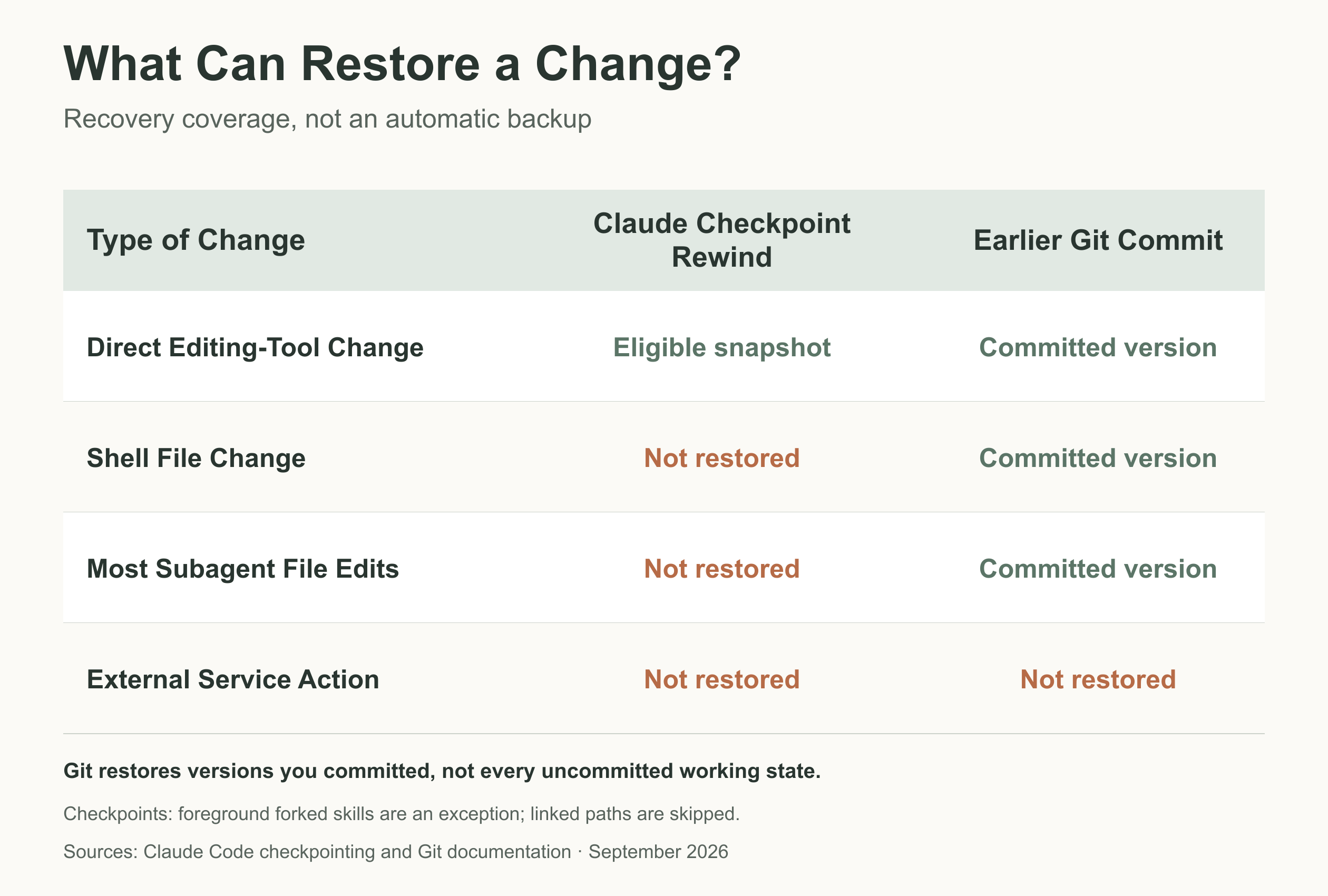
Claude's checkpoints have a narrower scope than a backup. Direct edits through its editing tools can be recoverable; shell-command changes, external state and most subagent edits are outside the main session's rewind coverage.
In the VS Code panel, hover over an earlier message and inspect the rewind options. Rewind code to here restores tracked code changes while retaining the conversation. Check what subsequent work would be lost before confirming.
Git provides a separate recovery history for committed work, not a magic undo button for everything in the folder. Preserve later valid edits and inspect the exact diff before any restore. A database migration, sent message or external API action needs its own recovery plan.
You are finished when the behavior matches the agreed cases, the diff is explainable, and missing checks are either resolved or explicitly accepted. Commit through the project's normal review process. A push, pull request and deployment are still separate decisions.
Frequently Asked Questions
Do I Need to Upload My Entire Repository First?
No separate repository upload is needed for this local extension workflow. Open the project and let Claude inspect the relevant files. That does not make provider processing local-only; use an approved account and data-sharing policy, and avoid supplying secrets or private data unnecessarily.
Why Does the Extension Work but the Claude Terminal Command Does Not?
The extension bundles a private runtime for its panel, but does not put claude on your shell's PATH. A separate CLI installation is needed if you want that terminal command. You can complete this workflow in the panel without adding it.
Should I Start With a Bug or a New Feature?
Choose a task with a clear expected result and a manageable dependency path. A reproducible bug with a nearby test is often easier to judge than an open-ended feature. A tiny cosmetic edit is useful for learning approvals, but it does not establish readiness for authentication, payments or data migrations.
What If the Suggested Fix Needs a New Dependency?
Ask why the existing stack cannot meet the requirement and what the dependency changes about installation, maintenance and deployment. Then make a separate decision. Do not let installing a package become an unnoticed consequence of approving a code edit.
Can I Keep Working Manually While Claude Is Editing?
Avoid simultaneous edits to the same files. Finish or pause one activity, inspect the combined state, and tell Claude what changed before it resumes. For genuinely independent work, agree on separate file ownership and use the project's established branch or worktree workflow.
Does a Passing Test Mean I Can Merge the Change?
A passing test alone is not enough to merge a change. Check that the test exercised the intended behavior and that the diff satisfies the full requirement. Repository review, security checks and release rules still apply. A test result is evidence for a particular claim, not approval for every downstream action.